Salon Phone Support Automation: Phone vs. Chat for Your Salon
Compare phone vs chat automation. Discover how salon phone support automation books clients, handles spoken requests, and frees up your staff. Learn more.

co-founder


The channel that interrupts your next appointment may be the one a client needs most. Salon phone support automation can handle a caller looking for an opening, while chat gives another client a quieter way to ask about a service or request an appointment change. But when calls pull you away from hands-on work and written messages wait until closing, inquiries can slip through.
You don’t have to guess which channel every client prefers. Phone and chat serve different needs, and using both gives clients more ways to reach you while reducing routine requests left for staff to handle. The key is deciding what each channel should take care of and when a person needs to step in.
This article compares phone and chat automation, then shows where each fits in a salon’s day. You’ll see how an AI receptionist can check availability, offer a suitable appointment, book within your configured rules, or hand an inquiry to staff. You’ll also learn how those steps can run through Beauty OS or a supported booking platform already in use.
Key Takeaways
- Use salon phone support automation to capture spoken requests when calls compete with consultations, services, or front-desk work.
- Map the client journey from inquiry to appointment: decide what the assistant can complete and when staff should take over.
- Compare phone and chat by the kind of request, client preference, and the amount of staff attention each channel requires.
- Choose a setup around your inquiry volume, booking rules, and current workflow, whether you use Beauty OS or a supported booking platform.
Table of Contents
- Salon phone support automation: what problem does it solve?
- How salon phone support automation handles a client request
- Phone vs. chat automation for salons: which channel fits?
- Choose salon phone support automation using your actual workflow
- Use AI Beauty Bot for salon phone and chat support
Salon phone support automation: what problem does it solve?
Salon phone support automation handles spoken client inquiries and booking requests, so a call doesn’t always have to interrupt a service to get a useful response. It focuses on phone conversations, while salon-management tools can also manage calendars, client records, and other day-to-day operations.
The distinction matters because different interruptions create different gaps. A missed call leaves the caller without an immediate response. An unanswered chat message sits in writing, waiting for someone to read and reply. Both can leave a client unsure what to do next, but phone automation addresses the moment a caller wants to speak with the salon.
When salon calls interrupt the work
Picture a fictional stylist, Maya, midway through a haircut. Her phone rings. The caller wants to know whether there’s an opening for a colour appointment, whether the salon offers a particular service, or how to change an existing booking. Maya can’t stop to answer without interrupting the client in her chair.
If the call goes unanswered, the caller may have to try again or wait for a response. Maya may later need to return the call between appointments while also keeping track of the original request. The pressure isn’t just the ringing phone. It’s the extra task and the uncertainty left on the client’s side.
Calls can compete with consultations, hands-on treatments, check-ins, and front-desk work. Asking staff to pick up every time may not be practical. Asking them to ignore every ring can leave straightforward questions and booking requests waiting alongside more complex matters.
What phone support automation should accomplish
Useful salon phone support automation gives callers a way to explain what they need without requiring the stylist to put down their tools. The AI receptionist can capture the request, check appointment availability, and offer a suitable opening. If the client accepts, it can book within the salon’s configured rules.
- The caller explains the request, such as looking for a haircut appointment or asking about an existing booking.
- The receptionist checks relevant availability and offers a suitable slot.
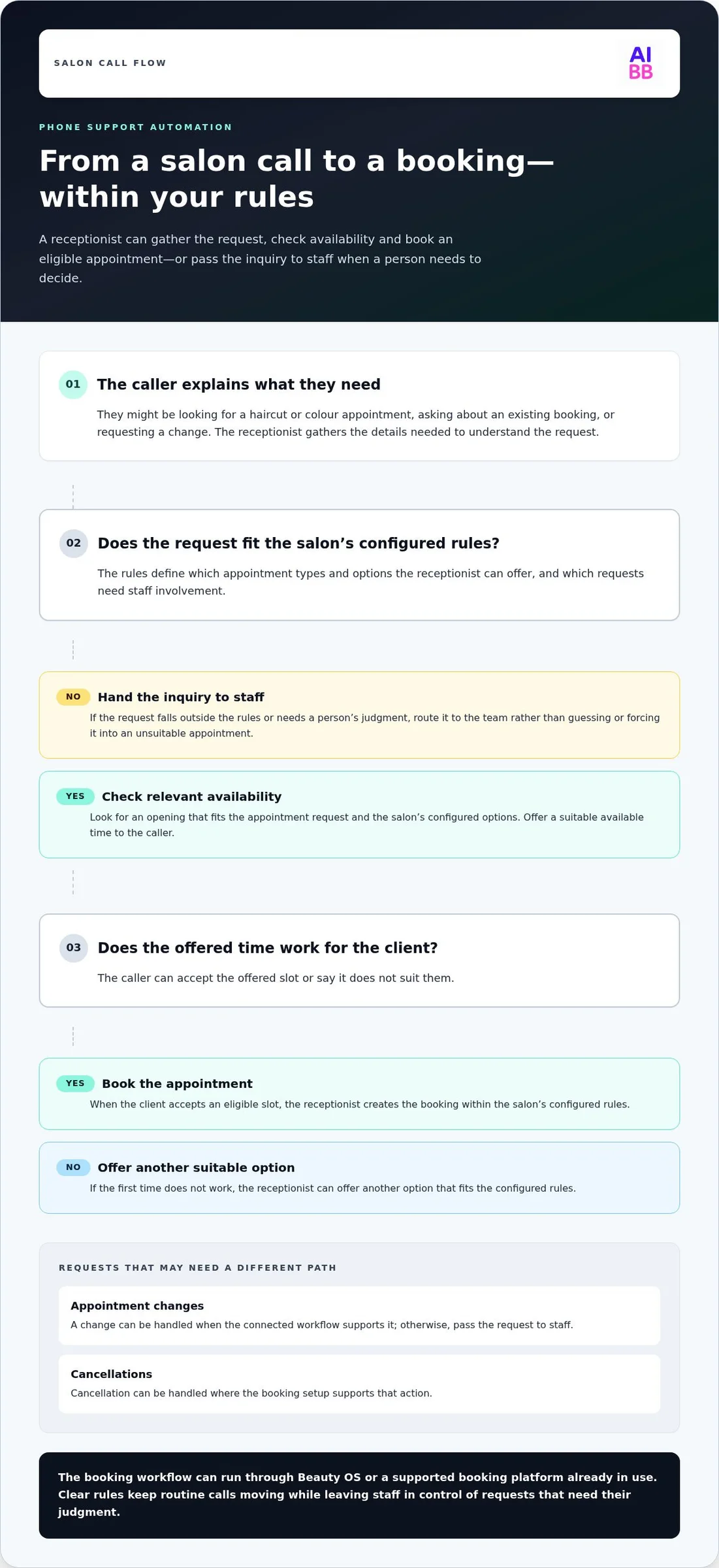
- If the booking fits the salon’s rules, the receptionist can create it. If the request needs a person’s judgment or falls outside those rules, it can be handed over to staff.
That handover matters. A client may have a question that depends on their service history or a request that needs staff attention. Automation should handle clear, routine steps and leave room for a person to take over when needed. The aim isn’t to remove staff from client care. It’s to stop every call from demanding an immediate interruption.
How salon phone support automation handles a client request
A useful call flow is simple: understand what the client wants, check the calendar, offer an available option, then book or pass the request to staff. Here’s how that might work for Elena, a fictional client calling to arrange a colour appointment.
- Elena explains her request. She asks for a colour appointment and shares her preferred days or times. The receptionist gathers the details needed to look for a suitable opening.
- The receptionist checks availability. It checks the salon calendar for an opening that fits the appointment request. Availability is only part of the decision: the salon’s configured rules determine which services, appointment types, and options the receptionist can offer.
- Elena chooses an offered time. The receptionist gives her a suitable available slot. If that time doesn’t work, it can offer another option that fits the configured rules.
- The appointment is booked or handed over. If Elena accepts an eligible slot, the receptionist creates the appointment. If her request needs staff judgment or falls outside the rules, it can hand the inquiry to the team instead.
From the first question to an available appointment
For example, the salon may configure which appointment types can be booked, what availability the receptionist can use, and which requests need staff involvement. Elena hears options shaped by those settings, not an open-ended promise that any time or service can be booked. Clear rules help keep the call practical while leaving the salon in control of what gets scheduled.
The interaction should also make the next step clear. Elena accepts an offered slot and the receptionist books it within the configured rules. If she asks for a service combination the salon has reserved for staff review, the receptionist shouldn’t force it into an unsuitable opening. It should route the request for human attention.
When a request needs staff involvement
Suppose Elena asks to add a second service that requires the salon to review timing or suitability. If that request falls outside the booking rules, the receptionist can hand it to staff rather than guessing. A handover keeps the conversation from becoming a dead end while allowing a team member to decide what works for the client and schedule.
Appointment changes and cancellations depend on the configured workflow and the connected booking setup. If a client calls to move an appointment, the receptionist can handle the change when that action is supported by the workflow; otherwise, it can pass the request to staff. Cancellation can also be handled where supported.
That’s the practical role of salon phone support automation: move straightforward requests toward a confirmed appointment, and bring staff in when the call needs a person’s judgment. If you’re mapping out this kind of call flow, explore how an AI receptionist for salons can fit into your client booking process.
Phone vs. chat automation for salons: which channel fits?
Phone and chat suit different kinds of client interactions. Salon phone support automation is a strong fit for callers who want to speak with someone or need to discuss a time-sensitive appointment question. Chat gives clients a written way to ask a question or make a request without calling. The best choice depends on what clients actually use and what your staff can manage during the day.
| Channel | Best-fit inquiry | Client preference | Operational trade-off |
|---|---|---|---|
| Phone | A time-sensitive question, spoken guidance, or help discussing appointment options | Clients who prefer to talk through a request | Can catch calls during hands-on work, but requests needing personal judgment may still require staff |
| Chat | A written question or routine appointment request | Clients who’d rather message than call | Creates a written exchange, but messages still need a clear path to a reply or staff handover |
| Phone and chat | A mix of spoken questions and written requests | Clients with different channel preferences | Offers more ways to reach the salon, while requiring clear rules for what each channel handles |
When phone support is the better fit
Prioritize phone support if callers often need to talk through appointment options, ask a time-sensitive question, or explain a request more easily aloud. It can also help when incoming calls regularly clash with consultations or hands-on services. Rather than interrupting the person working, the call can be handled through configured booking steps or passed to staff if it needs a human decision.
That handover is important. A caller may need advice that depends on personal context, not just an open slot. Automation can take care of a straightforward request, while staff remain involved for conversations that call for judgment or individual care.
When chat or a combined setup makes sense
Chat suits clients who prefer to write rather than call, or who want to send a request without starting a spoken conversation. It can be a convenient route for a routine question, but it isn’t automatically a better choice for everyone. A client who needs to explain a complicated issue may prefer a call.
Start with the channel that addresses your clearest gap. If calls interrupt services and clients commonly ask to speak, begin with phone. If written inquiries are piling up, chat may be the more useful first step. If both happen, voice and chat can complement each other, though their interactions don’t have to follow identical steps. Decide what each can complete, what requires staff, and how an inquiry moves to a person.
To make the choice practical, look at the requests arriving through each channel and the moments staff can’t respond. The goal isn’t to push every client toward one method. It’s to give clients a workable way to reach the salon while keeping routine inquiries from pulling staff away unnecessarily.
Choose salon phone support automation using your actual workflow
Choose a channel based on the inquiries your salon receives, the way clients prefer to contact you, and when staff can respond. A simple workflow review can show whether phone, chat, or both would ease the pressure without creating another queue to manage.
Map inquiries before selecting a channel
Start with the requests already coming in. Look at common phone questions, written messages, and appointment requests. Notice which ones need a quick answer, which can wait for staff, and when your team is usually occupied with clients.
Then let those patterns guide the channel choice. Don’t assume every client prefers to call or message. The useful question is where inquiries are getting stuck in your salon’s actual day.
- Review the requests. Group common inquiries by phone, chat, and booking task. Note whether clients are asking for availability, requesting an appointment, or needing a person to help with a more involved question.
- Mark the pressure points. Identify when calls interrupt services and when written inquiries wait unanswered. Consider who, if anyone, is available to respond during those periods.
- Choose what to address first. If phone requests are the main interruption, prioritize salon phone support automation. If messages are the bottleneck, prioritize chat. If both are regular pressure points, consider a combined setup with clear responsibilities for each channel.
Check booking workflow and handover needs
Next, decide where the booking work should happen. Beauty OS can be used as the salon-management setup, with its built-in CRM and calendar, or a supported existing booking platform can be connected. An external CRM isn’t required to use Beauty OS.
Write down what the client-facing receptionist may complete within your configured rules. Which appointment types can it book? Which requests should go to staff? Make those boundaries clear before turning routine inquiries into automated bookings.
Pay special attention to exceptions. A request outside the configured booking rules should reach staff instead of being forced through. The same applies to a change or cancellation if it isn’t available in the configured workflow or supported booking setup. Decide how those requests should reach the team, so clients aren’t left without a clear next step.
A useful final check is to walk through a typical inquiry from first contact to outcome. Can the assistant identify the request, offer an appropriate next step, and hand off anything that needs a person? If the answer depends on the channel, document the difference. Voice and chat can share a purpose without using identical workflows.
Once those choices are clear, compare them with your existing process and choose a setup that fits the work. Explore AI Beauty Bot to see how voice and chat assistance can fit into a salon’s inquiry and booking workflow.
Use AI Beauty Bot for salon phone and chat support
AI Beauty Bot provides a client-facing AI receptionist for salon phone and chat inquiries. Salons can use Beauty OS as their salon-management setup or connect a supported existing booking platform. Either way, the receptionist can handle requests within the salon’s configured rules, with staff available for inquiries that need a person. Choose the booking workflow that fits how your salon already manages appointments.
Choose the booking setup that fits your salon
Beauty OS combines salon management, a built-in CRM, calendar, shared inbox, and AI tools. A salon can use it independently, bringing client records and appointment management into one setup rather than relying on a separate external CRM.
If you already use a booking platform, a supported one can be connected instead. The receptionist can work with that booking setup, so adopting phone or chat automation doesn’t necessarily mean replacing your existing platform. Consider where your appointment information lives now and which setup your team wants to use to manage it.
Appointment synchronization is real time on AI Beauty Bot’s side. An external booking provider may introduce its own delays, so the experience can depend partly on that provider’s systems.
Set clear boundaries for automated client support
Before using the receptionist with clients, define the booking rules. Specify which appointment requests it can complete and which should go to staff. When a request fits those rules, the client-facing receptionist can check availability and book. When it needs a person’s judgment, the inquiry can be handed over rather than pushed into an unsuitable appointment.
Keep owner tasks separate from client requests. The AI receptionist speaks with clients and books within the salon’s configured rules. Owner Copilot is for owner-management changes and asks for confirmation before applying them. That distinction keeps routine client booking and decisions about managing the business in the right lanes.
Finally, match the plan to the way you intend to use voice. AI Starter and AI Pro include voice minutes, but that doesn’t mean every plan includes autonomous AI or unlimited calls. Compare the included voice allowance and plan features with your expected call volume, and decide how staff should receive inquiries the receptionist can’t complete.
A practical setup gives clients a way to reach the salon by phone or chat, while keeping booking rules and human handover clear. See how AI Beauty Bot can fit your salon.
Make your next step a simple workflow check
Before changing how your salon handles inquiries, choose one busy part of the day and notice what pulls staff away most: calls, written messages, or both. That gives you a practical starting point for salon phone support automation, without asking your team to change everything at once.
Then decide what a client should be able to complete independently and where a staff member should step in. A clear boundary makes automation more useful for clients and easier for your team to manage. You can refine the setup as you learn which requests come through each channel and where they tend to stall.
AI Beauty Bot offers voice and chat assistance designed for beauty salons, with a setup that can fit different booking workflows. See how AI Beauty Bot can handle salon inquiries and consider what would make the next busy day run more smoothly.
Start with the interruption you feel most often. A manageable first change can give your team more room to focus on the clients in front of them.
Frequently Asked Questions
Can salon phone support automation book appointments without staff approval?
Yes, eligible appointments can be booked without staff approving each individual reservation. The key setup decision is how broadly to enable self-booking: you might allow routine appointments while keeping selected services or new-client requests for staff review. That distinction gives clients a convenient way to reserve an opening without handing every scheduling decision to automation.
Can an AI receptionist handle a client who wants to change an appointment?
It can, if the salon’s booking workflow allows that type of change. Before relying on it, distinguish a straightforward time change from a request that also alters service details or requires salon judgment. Make sure clients receive a clear indication of whether their change was completed or still needs attention, so they don’t assume an unconfirmed calendar update has gone through.
Will salon phone support automation work with an existing booking platform?
Yes, when the existing platform is supported. To decide whether to keep your current setup, identify where staff actually manage appointments and client records today. A clear source for the team to check can help prevent confusion between separate calendars or records. Consider the daily staff workflow, not just whether a connection is technically possible.
Does phone automation mean a salon no longer needs staff to answer clients?
No. Automation can take care of routine interactions, but salon staff still provide personal care and handle decisions that depend on client context. Decide who owns inquiries that need follow-up and how the team will know they’re ready for attention. Capturing a request is only useful if someone remains responsible for seeing it through to a helpful resolution.
Should a small salon start with phone automation or chat?
Use a simple inquiry audit to make the choice. Note the channel each request arrives through, what the client needs, whether it gets resolved, and whether it pulls someone away from a service. Then start with the channel creating the clearest operational strain. Also consider which channel your team can consistently oversee, so the first change doesn’t create a new pile of unanswered requests.
Are AI receptionist voice minutes included in every salon plan?
No. AI Starter and AI Pro include voice minutes, but the included allowance and AI features depend on the plan. Compare the voice minutes and features included in your plan with your salon’s expected call volume. Voice access, call allowance, and autonomous booking are related but distinct plan considerations.