Salon Receptionist Software: How to Choose the Right Fit
Looking for the best salon receptionist software? Compare top options to automate bookings, answer client calls, and seamlessly sync with your salon CRM.

co-founder

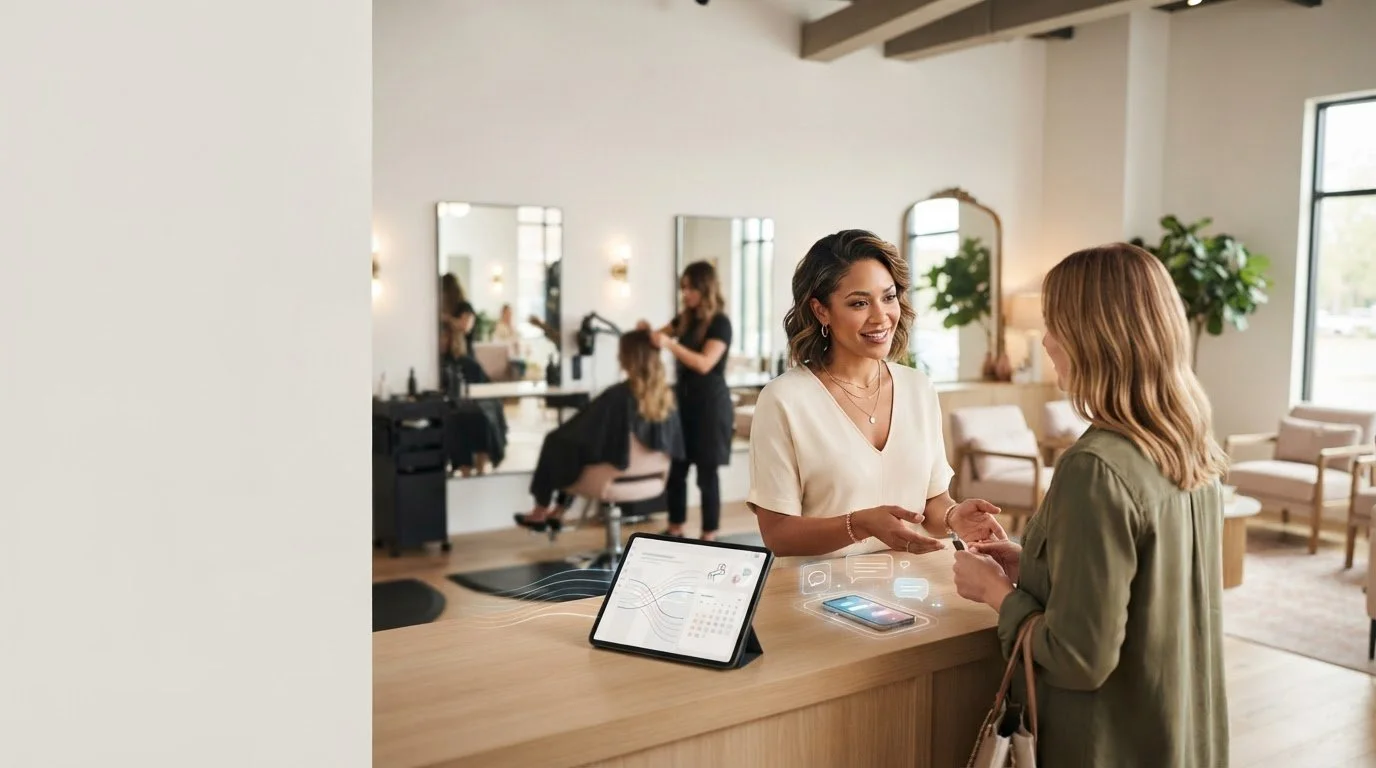
A client is checking out. The phone rings. A message arrives asking to book, and your next appointment is already waiting. That’s the front-desk squeeze salon receptionist software should help relieve. The right option can handle client questions and booking requests without creating another task for your team.
It’s easy to get lost in broad salon platforms packed with features you may not need. If appointment details don’t stay connected to your existing CRM and schedule, a new tool can add work instead of removing it.
This guide will help you identify the receptionist tasks that need coverage, compare options using practical salon-specific criteria, and find a fit for your appointment and CRM workflows. We’ll look at how tools handle calls, messages, inquiries, and bookings, and where they can ease pressure at the front desk. You’ll also see how AI Beauty Bot uses voice and chat to handle salon bookings and inquiries, with CRM integration to synchronize appointments and schedules in real time.
Key Takeaways
- Pinpoint the front-desk tasks that interrupt appointments or make client follow-up harder.
- Compare salon receptionist software by communication channels, booking workflows, client communication, and fit with your current systems.
- Distinguish receptionist tools from salon-management platforms and check-in tools by the job each is designed to handle.
- Use a simple decision process to match the right type of coverage to your salon’s team and daily workflow.
- See how a receptionist-focused voice and chat assistant can support bookings and inquiries while working alongside a salon CRM.
Table of Contents
- Salon Receptionist Software: Identify the Front-Desk Gaps You Need to Fill
- What to Compare in Salon Receptionist Software Before You Buy
- Compare Salon Receptionist Software Types Without Confusing Their Jobs
- Choose Salon Receptionist Software for Your Team and Daily Workflow
- How AI Beauty Bot Fits a Salon Receptionist Software Search
Salon Receptionist Software: Identify the Front-Desk Gaps You Need to Fill
A client is midway through a haircut or color service when the phone rings. You can pause, answer, and leave the person in your chair waiting. Or you can let it ring and risk missing a booking request. That tension points to a specific operational gap: client communication is competing with hands-on service.
Salon receptionist software supports the client-facing administrative work around appointments. Depending on the tool, that can include responding to calls or messages, handling common inquiries, and managing booking requests. It isn’t automatically a complete salon-management system, and it doesn’t necessarily handle in-person arrivals. First, identify which job is creating friction.
Which front-desk tasks are creating the most friction?
Review a typical week’s schedule alongside the moments you get interrupted. Note when calls and messages arrive, what clients ask, and whether requests are handled later, passed to a staff member, or missed. Look for recurring patterns rather than relying on a general sense of being busy.
- Missed inquiries: Calls or messages arrive while staff are with clients, and a potential client may not get a timely response.
- Booking administration: Clients want to arrange or change an appointment, or ask a booking question, pulling attention away from current services.
- In-person check-in: A client arrives and needs acknowledgment, directions, or help getting settled.
These tasks are related, but they aren’t interchangeable. A tool that supports calls and booking requests may ease interruptions without managing arrivals at the salon. A check-in screen may help greet clients who are already there, but it won’t necessarily answer a phone inquiry.
Separate repeatable work from judgment calls. Routine questions and straightforward booking requests can be suitable for consistent, automated handling. A sensitive complaint, unusual service request, or situation that depends on a stylist’s expertise may need a person to decide what happens next. This distinction helps you define where software should provide coverage and where your team should stay involved.
Receptionist software versus salon-management software
A broad salon-management platform may bring together scheduling, online booking, client records, staff tools, payments, and other business operations. That can suit a salon looking for a central system. But a long feature list doesn’t tell you whether the platform addresses your actual pinch point: responding to inquiries while staff are occupied.
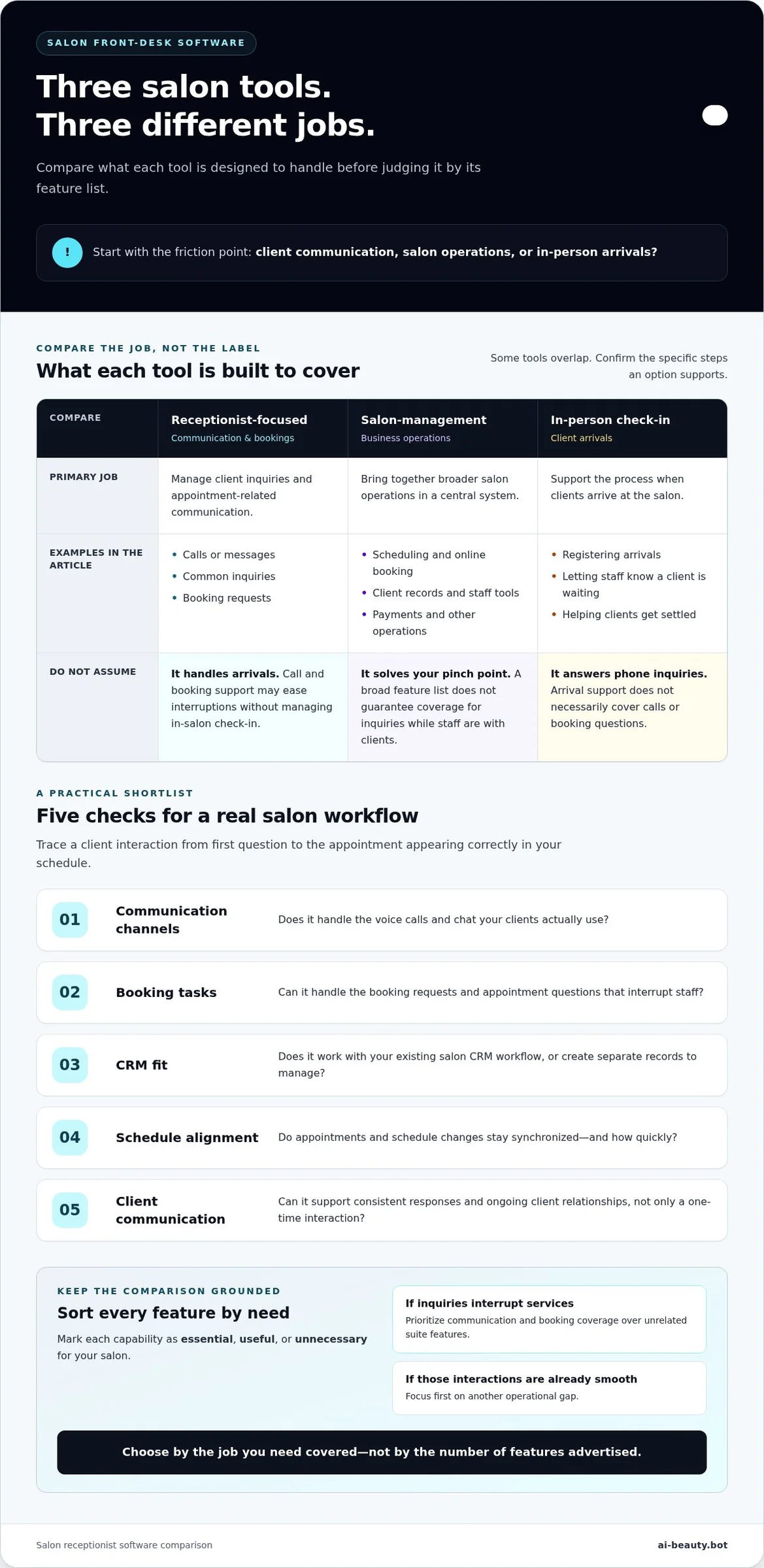
Receptionist-focused tools center on communication and booking support. In-person check-in systems focus on arrivals, such as helping clients register or letting staff know they’re waiting. Some tools overlap, but don’t assume one category covers the other. Trace each option through a real scenario: a client calls to ask about an appointment, requests a booking, then arrives for the service. Which steps does the tool support?
Use this definition when reviewing options: salon receptionist software helps manage client inquiries and appointment-related communication; it is not necessarily a full salon-management platform or an in-person check-in system. With that distinction clear, compare tools by the gap they fill, not by the number of features they advertise.
What to Compare in Salon Receptionist Software Before You Buy
A feature list can look impressive and still leave your busiest moments untouched. Compare each option against real client interactions, from the first inquiry to the appointment appearing correctly in your schedule. The right fit covers your current gaps and works with the processes your salon already relies on.
Use this checklist to keep your comparison practical:
- Channels: Does it handle the voice calls and chat your clients actually use?
- Booking tasks: Can it handle the booking requests and appointment questions that regularly interrupt staff?
- CRM fit: Does it work with your existing salon CRM workflow, or would your team need to manage separate records?
- Schedule alignment: Do appointments and schedule changes stay synchronized, and how quickly?
- Client communication: Can it support consistent responses and ongoing client relationships, rather than handling only a one-time interaction?
Mark each item as essential, useful, or unnecessary for your salon. A feature that sounds valuable in a demo may not solve a daily problem. If your main interruption is answering booking inquiries during services, prioritize communication and booking coverage over unrelated tools in a broader software suite. If your staff already manage those interactions smoothly, focus first on another operational gap.
Match software capabilities to client interactions
Start with the channels clients use, not the channels a software company happens to promote. If calls regularly go unanswered while providers are working, voice support may matter most. If clients commonly send written questions, look closely at chat coverage. Then trace a typical interaction: a client asks about an appointment, requests a booking, and expects a clear response. Does the software support those steps in a way that fits your salon?
Look at consistency, too. Clients should receive clear, useful responses to routine questions, rather than having each request depend on who happens to be free. Consistent communication can support stronger ongoing relationships, but it shouldn’t force every conversation through automation. Keep staff judgment available for situations that need a personal response.
Evaluate salon CRM and appointment synchronization
CRM fit is not a minor technical detail. It affects whether receptionist activity and appointment information stay aligned with the schedule your team uses. If a client books through one channel but the change doesn’t appear where staff manage appointments, someone may need to re-enter details or resolve conflicting information. That adds work where the software was meant to reduce it.
Compare each option against your current process. Where do staff view the schedule? Where are client details maintained? When a booking is handled, does the appointment synchronize with your salon CRM in real time? Treat synchronization as its own buying criterion, not an assumed benefit of any CRM connection. AI Beauty Bot’s voice and chat assistant handles salon bookings and inquiries, with CRM integration that synchronizes appointments and schedules in real time. Learn more about AI Beauty Bot’s salon receptionist software.
Keep the decision focused. Choose essential receptionist coverage first, then weigh broader suite features only if they support a workflow you want to improve. You’re not building the longest feature checklist. You’re finding a practical fit for the way clients contact your salon and your team manages appointments.
Compare Salon Receptionist Software Types Without Confusing Their Jobs
Three tools can sound like answers to the same front-desk problem, but they may cover different moments in a client’s visit. A broad salon platform supports business operations, a check-in tool focuses on arrivals, and receptionist-focused software centers on inquiries and booking communication. Compare the job each tool is designed to do before comparing feature lists.
| Tool type | Primary job | Typical workflow | Likely fit |
|---|---|---|---|
| Broad salon-management platform | Bring multiple salon operations into one system | Staff use a central platform for functions such as scheduling, online booking, and other management tasks. | Salons looking to coordinate several business processes in one place. |
| Client check-in tool | Manage the in-salon arrival experience | A client arrives, checks in, and signals that they’re ready or waiting. | Salons whose main friction happens at the door or reception area. |
| Receptionist-focused software | Support client inquiries, bookings, and communication | A client reaches out with a question or booking request, and the tool helps manage that interaction. | Salons where calls or messages compete with appointments and client care. |
Broad salon-management platforms
A broad platform can appeal to a salon that wants scheduling and several other operational functions handled in one system. That wider scope may simplify how the team works across daily business tasks. But breadth doesn’t automatically mean strong receptionist coverage. A platform may support scheduling without addressing the calls and inquiries that interrupt services. Separate the need for an overall management system from the need to handle client communication.
Start with the work you need covered. If your main goal is to bring business processes together, a broad suite may fit. If your schedule is already managed in a system that works, replacing it just to address unanswered inquiries could add unnecessary change. Let the gap, not the size of the platform, guide your decision.
Check-in tools and receptionist-focused software
Check-in software starts when a client arrives. It can help structure the in-salon welcome, but that focus doesn’t necessarily extend to questions or bookings coming in by phone or chat. Receptionist-focused software looks earlier in the client journey, supporting communication and appointment requests before the visit. The two categories may serve the same salon, but they solve different problems.
To identify your biggest gap, follow the client journey: Does the process break when someone tries to contact you, when they need to book, or when they walk through the door? Your answer tells you which category to prioritize. Then examine how a specific tool works in practice. Category labels are a starting point, not proof that a tool fits your workflow. For a receptionist-focused search, judge salon receptionist software by how well it covers the interactions your team needs help managing, not by its name alone.
Choose Salon Receptionist Software for Your Team and Daily Workflow
The right choice depends on where work gets stuck and who feels the interruption. An independent owner may be answering every call between services. In a multi-provider salon, inquiries may arrive while several stylists are occupied. A manager may need a consistent way to handle client communication and appointment information across the team. Start with the work, then compare tools.
Build a shortlist around your salon’s needs
Before looking at software options, write down the interactions that routinely interrupt appointments or other salon work. Be specific: “calls asking to book while I’m with a client” is more useful than “front desk is busy.” Then rank the gaps. Voice inquiries may be urgent for one salon; chat questions or booking administration may take priority for another.
- Record recurring interactions. Note the common questions clients ask, how they try to reach you, and which booking steps take staff away from other work.
- Rank the pressure points. Decide which needs matter most: voice inquiries, chat interactions, handling booking requests, or keeping communication consistent.
- Define the outcome. State what should change in the workflow. For example, routine inquiries should receive consistent responses, or booking activity should connect with the schedule your team uses.
- Separate essentials from extras. Mark the capabilities that directly address those outcomes as must-haves. Set aside appealing features that don’t solve a current problem.
This helps an independent owner focus on features that address their actual needs and gives a manager a way to compare requirements across the team instead of relying on one person’s preferences. For a multi-provider team, identify where inquiries go now and how staff know whether a booking request has been handled. The goal is a workable process, not a longer feature list.
Check fit with existing salon processes
Next, trace one inquiry from start to finish. A client asks about an appointment, shares the details needed to book, and expects the schedule to reflect the result. Identify where each step happens today, who handles it, and where information is recorded. This walkthrough can show whether a new tool supports your process or creates another place for staff to check.
Look closely at CRM integration and schedule synchronization. If appointment information is handled in your existing salon CRM, consider how the receptionist tool fits that workflow and whether appointments and schedules stay aligned. Real-time synchronization keeps appointment information connected and reduces the need for manual re-entry. For teams focused on client retention, consider whether the communication flow supports consistent follow-up and a reliable client experience.
Now make a shortlist. Keep options that address your highest-priority interactions, fit the way your salon manages appointments, and support the client communication your team wants to maintain. Choose based on workflow fit, not the number of features. If voice and chat coverage for salon inquiries and bookings is central to your shortlist, explore AI Beauty Bot’s receptionist solution.
How AI Beauty Bot Fits a Salon Receptionist Software Search
Once you’ve identified the front-desk work that needs coverage, compare solutions by their role. AI Beauty Bot provides a subscription-based receptionist assistant designed for beauty salons. Beauty OS includes its own salon CRM, calendar and client records, with the AI receptionist built in. You can use Beauty OS on its own without an external CRM, or connect a supported booking platform such as Altegio, Square Appointments, Acuity Scheduling or SimplyBook.me and keep the calendar you already use.
Where the AI Beauty Bot assistant fits
AI Beauty Bot’s voice and chat assistant handles salon bookings and client inquiries automatically. It helps salons manage those interactions while providers are busy with appointments. Consider whether these channels match how your clients reach you and whether more consistent handling of routine requests would support the experience you want clients to have.
Consistent communication can also support client retention. The assistant helps manage inquiries and bookings through voice and chat. Its role is receptionist-focused: client-facing communication and appointment tasks, not every function in a broad salon-management suite.
Check how it fits your existing workflow
Think through your current path from inquiry to appointment. Where does the request arrive? Where is the appointment recorded? What does your team use as its working schedule? AI Beauty Bot integrates with salon CRMs to synchronize appointments and schedules in real time. That integration helps receptionist activity fit the system your salon already uses to manage appointments, rather than creating disconnected information for staff to reconcile.
Use your own workflow as the test. If an inquiry becomes a booking, consider how the CRM connection supports the way your team keeps its schedule current. If consistent client communication is part of your retention approach, consider how voice and chat coverage fits alongside the interactions your staff handle personally. The goal is a clear division of work that supports your salon’s process.
Before deciding, revisit the criteria from your comparison: the interactions you need handled, the booking work involved, and the importance of CRM and schedule alignment. AI Beauty Bot provides receptionist coverage for client inquiries and bookings, with CRM integration as part of its appointment workflow. Its AI receptionist works with the CRM built into Beauty OS or with a supported external booking platform; an external CRM is optional.
Ready to compare that fit with your front-desk needs? Explore AI Beauty Bot’s receptionist and client-retention subscription to see how its voice, chat, booking, and CRM capabilities align with the work your salon wants covered.
Make Your Next Front-Desk Decision with Confidence
The right salon receptionist software should support the way you want client communication to work, not force your team into an awkward process. Before making a decision, choose one recurring interaction as your practical test: a booking request, a routine question, or a client message that currently pulls attention from other work.
Keep that example in view as you consider your options. Decide whether the tool fits your existing routine and makes clear what happens next. A focused decision is easier to act on than a search for a perfect platform with every possible feature.
If receptionist coverage is the gap you’re ready to address, see how AI Beauty Bot fits your salon’s workflow. Explore AI Beauty Bot for your salon and take the next step toward a more manageable front desk.
Frequently Asked Questions
What is salon receptionist software?
Salon receptionist software helps manage client-facing work, such as answering inquiries and handling appointment requests. The exact role varies: one tool may focus on check-in, while another supports receptionist workflows or wider salon operations. To identify what you need, review a recent busy day and note which client interactions were delayed, repeated, or handed off. That list gives you a practical starting point for comparing options.
Is salon receptionist software the same as salon management software?
No, not necessarily. Salon-management software may cover a broad range of business operations, while receptionist software centers on client communication and booking-related work. Some tools overlap, so look beyond the category name. For example, if your schedule already works well but incoming questions interrupt services, a receptionist-focused tool may be a closer match than changing your entire management setup.
Can salon receptionist software handle appointment bookings?
Some options are designed to handle bookings, but the exact workflow depends on the product. Consider a client asking to move an appointment: the process should fit how your salon records changes and keeps staff informed. AI Beauty Bot’s voice and chat assistant handles salon bookings and client inquiries, and its CRM integration synchronizes appointments and schedules in real time.
Does salon receptionist software replace a human receptionist?
Not automatically. Software can support defined tasks, while your team decides how to handle conversations that need personal judgment. A routine question about booking differs from a client explaining a concern about a previous service. Write down which interactions follow a consistent process and which should go to a staff member. That boundary helps you use automation as support, not as a substitute for every human conversation.
How does salon receptionist software work with a salon CRM?
CRM integration connects receptionist activity with the client and appointment information your salon manages, though the level of connection varies by tool. Think through a change to an existing booking: where should that information appear so the right team members can act on it? AI Beauty Bot integrates with salon CRMs to synchronize appointments and salon schedules in real time, keeping the workflow connected.
Is salon receptionist software suitable for a small salon?
It can be worth considering if inquiries or booking tasks interrupt services, even when one owner handles the front desk. Start with a simple record of the work that gets postponed, such as returning a booking message after a treatment or pausing a consultation to answer a call. Then compare tools against those specific situations. Your workflow and communication needs matter more than the size of your team.
What should I look for when choosing salon receptionist software?
Start by identifying the interactions you want covered, then check how a tool fits your booking process and the systems your staff already use. For a practical comparison, write down a typical inquiry and trace what should happen from first contact to a recorded appointment. Include how the client receives a response and how staff see the booking. This reveals workflow gaps that a feature list alone can hide.